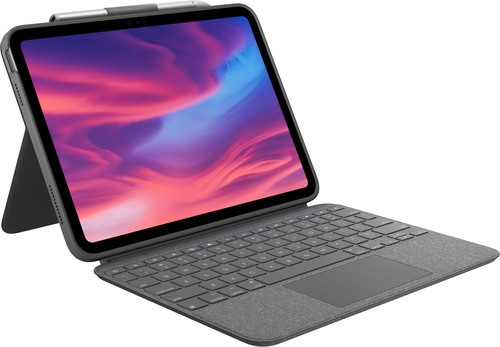
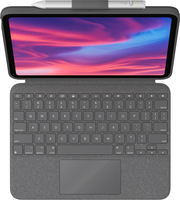
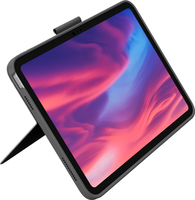
Logitech Combo Touch Grey Smart Connector QWERTY UK English
Product Technical Specification
| Keyboard | |
| Keyboard layout | QWERTY |
| Keyboard language | UK English |
| Pointing device | Touchpad |
| Numeric keypad | No |
| Hot keys | Yes |
| Multimedia keys | Yes |
| Key pitch | 18 |
| Key travel distance | 1 |
| Performance | |
| Brand compatibility | Apple |
| Compatibility | iPad (10th gen) Model: A2696, A2757, A2777 |
| Product colour | Grey |
| Colour name | Oxford Grey |
| Cover | Yes |
| Backlight | Yes |
| Protection features | Scratch resistant,Spill-resistant |
| Pen holder | Yes |
| Ports & interfaces | |
| Connectivity technology | Docking |
| Device interface | Smart Connector |
| Power | |
| Power source | Dock |
| System requirements | |
| Mobile operating systems supported | iPadOS |
| Weight & dimensions | |
| Width | 190.9 |
| Depth | 19.2 |
| Height | 253.3 |
| Weight | 572 |
| Packaging content | |
| Packaging content | |
Delivery Options

Economy Delivery (UK)

Business Express
Achieve more with the incredibly versatile Combo Touch keyboard case for iPad.
A CASE YOU’LL REALLY CLICK WITH
The ultimate case for iPad (10th gen) has just touched down. Combo Touch combines a large bottom-click trackpad with a full-size keyboard for your iPad. Full Multi-Touch™ gesture support transforms your iPad into a productivity machine for working in spreadsheets and docs, editing photos and videos, taking remote classes, and more—the possibilities are endless.
FOUR USE MODES
Combo Touch has four use modes to help you accomplish any task, anywhere.
TYPE MODE
Dock the keyboard upright, pull out the kickstand, and you’re ready to type out notes, emails, and more.
SKETCH MODE
Fully extend the kickstand for the perfect angle to take handwritten notes and draw with Logitech Crayon or Apple Pencil®
VIEW MODE
Detach the keyboard and pull out the kickstand to watch movies and videos.
READ MODE
Detach the keyboard—or reattach it with the keys turned inward—to read books, articles, and more.
YOUR FINGERS WILL THANK YOU
Over 20 years of typing innovation goes into every keyboard Logitech makes so your keystrokes are fluid, natural, and accurate. Enjoy hours of comfortable typing thanks to large, well-spaced keys stretched edge-to-edge so your hands won’t feel crowded. Logitech keyboards feature a scissor mechanism beneath each key to deliver the perfect bounce every time.
LEAVE THE KEYBOARD BEHIND
Done typing? Just detach the keyboard so you can sketch, read or watch videos without anything between you and your beautiful iPad® screen. Then use the adjustable kickstand’s 50 degrees of tilt to find that perfect viewing angle.
PREMIUM TRACKPAD EXPERIENCE
The high precision trackpad gives you more freedom, more control, and more accuracy to tackle tasks in apps such as Safari®, Keynote®, and Pages®. Plus, the larger trackpad supports all the Multi-Touch™ trackpad gestures you already know and love. Swipe, tap, pinch, and scroll your way through your day.
ADJUSTABLE KICKSTAND
The ultra-flexible kickstand offers an incredible 50-degrees of tilt so you can always find the right angle for the task at hand. A sturdy mechanical hinge ensures the kickstand stays firmly in place and does not collapse, even with strong tapping.
SECURE FORM-FIT PROTECTION
It’s not just protection. It’s peace of mind. Combo Touch is molded to perfectly fit your iPad, protecting the front, back, and corners from scrapes and bumps. Rest assured your iPad is secure and won’t slip out of the case, so you can focus on what matters—getting things done.
TYPE DAY OR NIGHT
Backlit keys automatically adjust to your environment with 16 levels of brightness so you can stay focused in any lighting. Shortcut keys at the top of the keyboard allow you to manually adjust brightness.
FULL ROW OF iPadOS SHORTCUT KEYS
Forget hunting through on-screen menus. Combo Touch gets it done with a full row of iPadOS® shortcut keys. Easily access media controls, brightness levels, Screenshot, Dictation, and more.
1 - Home: Go to home screen
2 - Screen brightness: Adjust brightness up or down
3 - Dictation: Access voice-to-text features
4 - Virtual Keyboard: Shows/hides the onscreen keyboard
5 - Screenshot: Take photo of current screen
6 - Key Brightness: Adjust key backlighting up or down
7 - Media controls: Back, Play/Pause, Forward
8 - Volume controls: Mute, Volume up, Volume down
POWER AND PAIR IN ONE CLICK
Combo Touch instantly pairs with your iPad via Smart Connector. And batteries aren’t included because you’ll never need them—power is sourced directly from iPad.
HOME FOR YOUR LOGITECH CRAYON
A built-in holder for Logitech Crayon or Apple Pencil keeps your digital pencil always within reach so you can easily hand-write notes, sketch drawings, or markup documents directly on iPad.
PERFECTLY COMPLEMENTS YOUR iPAD
The iPad meets its aesthetic match with a clean, sleek design—the thinnest keyboard case we've ever designed with a trackpad. The elegant woven outer fabric feels as great as it looks.
AUTO ON/OFF
Simply open up Combo Touch to wake iPad and turn the keyboard on. Then close it to put them both to sleep automatically.
LOGITECH CONTROL APP
For the best experience, keep your Combo Touch firmware up to date using the Logitech Control app.
| Keyboard | |
| Keyboard layout | QWERTY |
| Keyboard language | UK English |
| Pointing device | Touchpad |
| Numeric keypad | No |
| Hot keys | Yes |
| Multimedia keys | Yes |
| Key pitch | 18 |
| Key travel distance | 1 |
| Performance | |
| Brand compatibility | Apple |
| Compatibility | iPad (10th gen) Model: A2696, A2757, A2777 |
| Product colour | Grey |
| Colour name | Oxford Grey |
| Cover | Yes |
| Backlight | Yes |
| Protection features | Scratch resistant,Spill-resistant |
| Pen holder | Yes |
| Ports & interfaces | |
| Connectivity technology | Docking |
| Device interface | Smart Connector |
| Power | |
| Power source | Dock |
| System requirements | |
| Mobile operating systems supported | iPadOS |
| Weight & dimensions | |
| Width | 190.9 |
| Depth | 19.2 |
| Height | 253.3 |
| Weight | 572 |
| Packaging content | |
| Packaging content | |
Buykingston order despatch times:
We will despatch your order the very same day if we receive cleared payment by 12:00 pm Mon-Fri.
These delivery estimates apply when you order up to 12:00 pm Mon-Fri (excluding public holidays).
We charge a one off delivery cost as outlined below regardless of how many items you order or the weight of your order.
Estimated delivery times are provided to us by the respective delivery companies. We pass this information onto you, the customer.
Despatch times do not apply to UK public holidays.
Estimated delivery times are taken from the next available working day available for delivery. For example if an order was despatched on a working Wednesday by 3pm, the first available working day for delivery would be Thursday provided you placed your order by 3pm on the Wednesday. If the next available weekday is a UK bank holiday/public holiday then your order will be despatched on the next available working day.
Our warehouse reserves the right to upgrade the delivery method you select on your order.
Our available delivery options*
Contact us for a shipping quote.
*All delivery times are estimated unless stated.
Product Returns Note
Buykingston offers a simple, hassle-free returns policy. If for whatever
reason you are not happy with the item purchased, you can return it to us
within 14 days of receipt for a refund. This applies to items purchased
direct through Buykingston only.
Our 14 Day Returns Money Back Guarantee:
For items returned in resaleable condition, with all original packaging. If
an item has been opened for inspection but shows signs of use beyond that, a
deduction may apply to reflect the reduced value — see our full
Terms & Conditions
(Section 12) for details.
Some items are excluded from our money-back guarantee unless they have developed a fault. These include:
- Headphones
- Earphones
- Custom made and designed products, such as flash memory products with
custom logos on them, e.g. USB flash drives and memory cards with your own
logo
Returns FAQs
What is your returns criteria?
14 days from date of receipt, or expected date of receipt on non-tracked
items.
How do I go about returning my order?
Please contact us
via our contact page with your order number. We will provide you with an RMA
number and return instructions, including your return deadline and whether a
freepost label applies to your order.
Do I need to contact you before returning my order?
Yes, to obtain an RMA number before sending anything back.
Does my item have to include its original packaging?
Yes, to qualify for our 14 day money-back guarantee. For faulty items, we
understand you may no longer have the original packaging.
Who pays for return postage?
If your item is faulty, damaged, or not as described, we cover reasonable
return postage, or provide a freepost label where available. If you are
returning an item for another reason (including simply changing your mind),
you are responsible for return postage unless we have expressly confirmed a
freepost label in your RMA email — we recommend using a tracked and
insured service for items of significant value.
Who deals with the warranty on a faulty item?
We will. In some circumstances we may ask you to contact the manufacturer
directly for assistance.
Please ensure you have read and comply in full with Sections 11–13 of our Terms & Conditions.