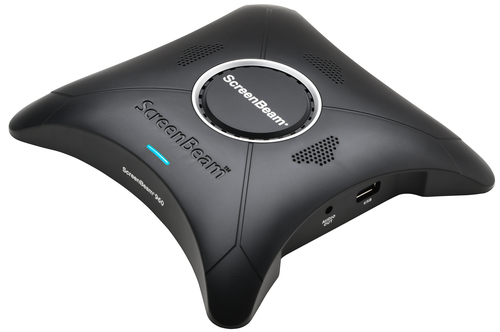

ScreenBeam 960 AV receiver Black
Product Technical Specification
| Features | |
| Type | AV receiver |
| Maximum resolution | 1920 x 1080 |
| Supported network protocols | WPA2-PSK (AES), PEAP-MSCHAP V2, EAP-TLS |
| LED indicators | Yes |
| Supported video modes | 1080p |
| Audio formats supported | LPCM |
| Security algorithms | EAP-TLS,PEAP,WPA-PSK,WPA-TKIP,WPA2-PSK |
| Video compression formats | H.264 |
| HDCP | Yes |
| Product colour | Black |
| Windows operating systems supported | Windows 10,Windows 8.1 |
| Mac operating systems supported | Mac OS X 10.10 Yosemite,Mac OS X 10.11 El Capitan,Mac OS X 10.12 Sierra,Mac OS X 10.13 High Sierra,Mac OS X 10.14 Mojave,Mac OS X 10.15 Catalina,Mac OS X 10.15.3 Catalina,Mac OS X 10.9 Mavericks,Mac OS X 11.0 Big Sur |
| Ports & interfaces | |
| Connectivity technology | Wired & Wireless |
| Wi-Fi | Yes |
| Bluetooth | Yes |
| Bluetooth version | 4.0 |
| Ethernet LAN | Yes |
| RJ-45 input ports | 1 |
| VGA (D-Sub) input ports | 1 |
| VGA (D-Sub) output ports | 1 |
| Number of HDMI outputs | 1 |
| USB ports quantity | 1 |
| USB version | 2.0 |
| USB connector type | USB Type-A |
| 3.5 mm (1/8-inch) out | Yes |
| DC-in jack | Yes |
| Power | |
| Power source type | DC |
| Operating voltage | 5 |
| Input current | 2 |
| Power consumption (typical) | 5 |
| External power adapter | Yes |
| Operational conditions | |
| Operating temperature (T-T) | 0 - 40 |
| Storage temperature (T-T) | 0 - 70 |
| Operating relative humidity (H-H) | 10 - 85 |
| Storage relative humidity (H-H) | 5 - 90 |
| Weight & dimensions | |
| Width | 168 |
| Depth | 168 |
| Height | 34.5 |
| Packaging data | |
| Package width | 203.2 |
| Package depth | 228.6 |
| Package height | 66.04 |
| Package weight | 635.029 |
| Packaging content | |
| AC adapter included | Yes |
| Cables included | HDMI |
| Quick start guide | Yes |
| Technical details | |
| Sustainability compliance | Yes |
| Sustainability certificates | UL ECOLOGO |
| Compliance certificates | CE,RoHS |
| Logistics data | |
| Master (outer) case width | 426.72 |
| Master (outer) case length | 609.6 |
| Master (outer) case height | 279.4 |
| Master (outer) case gross weight | 13154.2 |
| Products per master (outer) case | 18 |
Delivery Options

Economy Delivery (UK)

Business Express
ScreenBeam 960 wireless display receiver enables native screen mirroring from your Windows, Android and Apple devices — without apps or wires.
ScreenBeam 960 makes it easy to connect your mobile device to the room display with a single click or swipe. Extended desktop maintains device use for other actions while presenting, and support for interactive touch displays and wireless touch brings collaboration to the front-of-room display. Central Management System (CMS) software is included for remote management of receivers, providing enterprise-class security and manageability that IT departments need.
How Miracast Is Digitally Transforming Meeting Spaces and Classrooms
Achieve effective collaboration with touch displays and Windows Ink
Increasingly, organizations are removing whiteboards from their meeting spaces and classrooms and installing interactive touch displays. Together, ScreenBeam and Windows 10 maximizes that investment with support of Windows Ink which makes it simple to get your team members or students working together. Marking up content and images or creating sticky notes gets a point across efficiently. Then ScreenBeam’s unique support of touch displays allows all those annotations to be instantly captured and saved on the presenter’s Windows 10 device screen. It’s that easy.
Extended Desktop vs Mirror Screen
ScreenBeam offers extended mode so device is still usable for other actions.
Unlike other wireless display options, ScreenBeam natively supports the Miracast standard built into Windows 10/8.1 so presenters can both wirelessly duplicate content on their screen to a display, and use extended desktop. In extended mode, a single “extended” screen is created between your device and the wireless display. Now the desktop and icon images are displayed on your notebook, desktop or tablet, while the background image (or wallpaper) is extended to the second display. You can interact with different content on each display. Use extend mode whenever you anticipate you’ll need your device for other actions such as quickly accessing your web browser or taking an important call!
Modern Meetings
ScreenBeam 960 transforms meeting rooms into collaborative work spaces by offering native screen mirroring from your Windows, Apple and Android devices. ScreenBeam wireless display eliminates the frustration of finding cables or downloading apps so meetings start on time and switching presenters doesn’t cause delays. Presenters can drive and interact with their content from anywhere in the room for improved meeting collaboration, interaction and productivity. With support for the Miracast technology standard, Windows device users enjoy extended desktop, and touch display and Windows Ink support, so annotations on the touch display are instantly captured and saved on the presenter’s device.
Interactive Classrooms
When teachers are free to move and interact with their students during lessons, students are more successful. ScreenBeam wireless display makes teachers more accessible making it easier to observe student reaction, identify issues and help off-task students refocus without singling them out. ScreenBeam allows teachers to approach teaching and learning from a visual perspective, embedding learning at a deeper level and making learning more enjoyable. When teachers combine OneNote and ScreenBeam technology, they can share their notes, presentations and more directly to student devices or classroom display and increase classroom collaboration.
Specifically Designed For Enterprise Environments
ScreenBeam 960 was specifically designed to address the needs and demands of modern enterprises. It delivers connectivity in dense wireless environments, access control, configurability, security, and management, as well as easy help-desk support that businesses need to stay productive with wireless display. This fully integrated enterprise class platform boasts .11ac and .11n dual radios, Ethernet, HDMI, VGA In, and VGA out interfaces. Extensive mounting and placement options give IT professionals’ flexibility to mount to ceilings, tables, or hidden locations. VGA input gives back the capability for non-wireless clients to connect the old way. ScreenBeam 960 helps eliminate cable clutter while also making it easy for users to seamlessly connect and share content.
Device Management for IT Teams
ScreenBeam Central Management System (CMS) is included with the ScreenBeam 960 with a free perpetual license for the life of the product. CMS includes a software that enables IT to easily deploy, manage, remotely configure, group, customize, apply policies, and push device firmware updates to all ScreenBeam receivers within the network. With the free ScreenBeam local management console included in the receiver, set up is simple. Users may rename a receiver, manage display ports, or change the PIN pairing password and much more.
| Features | |
| Type | AV receiver |
| Maximum resolution | 1920 x 1080 |
| Supported network protocols | WPA2-PSK (AES), PEAP-MSCHAP V2, EAP-TLS |
| LED indicators | Yes |
| Supported video modes | 1080p |
| Audio formats supported | LPCM |
| Security algorithms | EAP-TLS,PEAP,WPA-PSK,WPA-TKIP,WPA2-PSK |
| Video compression formats | H.264 |
| HDCP | Yes |
| Product colour | Black |
| Windows operating systems supported | Windows 10,Windows 8.1 |
| Mac operating systems supported | Mac OS X 10.10 Yosemite,Mac OS X 10.11 El Capitan,Mac OS X 10.12 Sierra,Mac OS X 10.13 High Sierra,Mac OS X 10.14 Mojave,Mac OS X 10.15 Catalina,Mac OS X 10.15.3 Catalina,Mac OS X 10.9 Mavericks,Mac OS X 11.0 Big Sur |
| Ports & interfaces | |
| Connectivity technology | Wired & Wireless |
| Wi-Fi | Yes |
| Bluetooth | Yes |
| Bluetooth version | 4.0 |
| Ethernet LAN | Yes |
| RJ-45 input ports | 1 |
| VGA (D-Sub) input ports | 1 |
| VGA (D-Sub) output ports | 1 |
| Number of HDMI outputs | 1 |
| USB ports quantity | 1 |
| USB version | 2.0 |
| USB connector type | USB Type-A |
| 3.5 mm (1/8-inch) out | Yes |
| DC-in jack | Yes |
| Power | |
| Power source type | DC |
| Operating voltage | 5 |
| Input current | 2 |
| Power consumption (typical) | 5 |
| External power adapter | Yes |
| Operational conditions | |
| Operating temperature (T-T) | 0 - 40 |
| Storage temperature (T-T) | 0 - 70 |
| Operating relative humidity (H-H) | 10 - 85 |
| Storage relative humidity (H-H) | 5 - 90 |
| Weight & dimensions | |
| Width | 168 |
| Depth | 168 |
| Height | 34.5 |
| Packaging data | |
| Package width | 203.2 |
| Package depth | 228.6 |
| Package height | 66.04 |
| Package weight | 635.029 |
| Packaging content | |
| AC adapter included | Yes |
| Cables included | HDMI |
| Quick start guide | Yes |
| Technical details | |
| Sustainability compliance | Yes |
| Sustainability certificates | UL ECOLOGO |
| Compliance certificates | CE,RoHS |
| Logistics data | |
| Master (outer) case width | 426.72 |
| Master (outer) case length | 609.6 |
| Master (outer) case height | 279.4 |
| Master (outer) case gross weight | 13154.2 |
| Products per master (outer) case | 18 |
Buykingston order despatch times:
We will despatch your order the very same day if we receive cleared payment by 12:00 pm Mon-Fri.
These delivery estimates apply when you order up to 12:00 pm Mon-Fri (excluding public holidays).
We charge a one off delivery cost as outlined below regardless of how many items you order or the weight of your order.
Estimated delivery times are provided to us by the respective delivery companies. We pass this information onto you, the customer.
Despatch times do not apply to UK public holidays.
Estimated delivery times are taken from the next available working day available for delivery. For example if an order was despatched on a working Wednesday by 3pm, the first available working day for delivery would be Thursday provided you placed your order by 3pm on the Wednesday. If the next available weekday is a UK bank holiday/public holiday then your order will be despatched on the next available working day.
Our warehouse reserves the right to upgrade the delivery method you select on your order.
Our available delivery options*
Contact us for a shipping quote.
*All delivery times are estimated unless stated.
Product Returns Note
Buykingston offers a very flexible and hassle free returns policy. If
for whatever reason you are not happy with the item purchased you can return
it to us within 12months for a refund (for unused and unopened
items) or within 30 days on opened and used items for a refund. This
applies to items purchased direct through Buykingston only.
Our 30 Day Returns Money Back Guarantee Satisfaction
Guarantee:
For items opened and used and that are returned in a resellable
condition.
Our 365 Day Returns Money Back Guarantee Satisfaction
Guarantee:
For items that remain sealed and unused.
Some items are excluded from our moneyback guarantee unless they have developed a fault. These include;
- Headphones
- Earphones
- Custom made and designed products such as flash memory products with
custom logo’s on them. E,g USB flash drives and memory cards with your own
logo
Returns FAQs
What is your returns criteria?
On opened items 30 days from date of receipt or expected date of receipt on
non tracked items.
On unopened items 365 days.
How do i go about returning my order?
Please contact us via our contact page with
your order number where we will present you with an RMA number and returns
label.
Do i need to contact you before returning my order?
Yes, to obtain an RMA number.
Does my item have to include its original packaging?
Yes for items that fall within our 30 day money back guarantee and our 365
day returns. Of course for faulty items we realise you may no longer have
the packaging.
Who deals with the warranty on a faulty item?
We will. In some circumstances we may ask you to contact the manufacturer
direct for assistance.
Please ensure you have read and comply in full with Section 11 & 13 of our terms and conditions which you can read here in full.